
Basic principles in MetaCroc #
Several principles exists across the MetaCroc. Here is a description of them.
Versioning #
MetaCroc stores all historical versions of all elements. It works in the same way as in other versioning systems - user trigger Push action that creates a new version of the element in the history.
Version metadata is stored as well - user info, version timestamp and version comment.
Start editing #
All elements are in read-only mode by default. User can switch to edit mode by pressing Edit button. Element is locked for the current user.
Autosaving #
During editing, MetaCroc autosaves changes done by a user to a user-specific working area. These autosaved changes are not visible for other users. Autosaving status is available on tab bar.
It affects behaviour of Preview - other users generate preview from pushed data, user making changes create preview from autosaved data.
This behaviour of generating of code work with Preview only. Other ways to generate code work with the latest or selected pushed version of metadata.
Collaboration #
MetaCroc works with element locking. When a user starts element editing, MetaCroc locks the element for the user. It is marked by a green lock icon next to the element in the project tree.
Elements locked by other users are marked by a red lock icon.
MetaCroc locks individual elements only. It is not possible to lock the whole folder and expect all element in it are locked as well.
Lock is activated by pressing button Edit as a start editing element or by pressing button Lock.
Push a new version #
Autosaved changes are pushed to the element history as a new version by pressing a Push button. A push dialog appears:
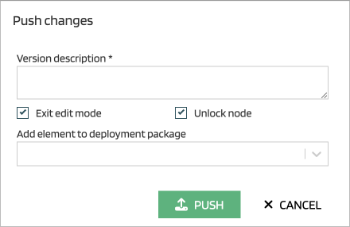
After filling a version description, the new version is pushed to the element history and is available for other users.
When user cancels editing by pressing Cancel button, all autosaved changes are deleted. The same happens when any other user with a proper permissions force unlocks the element.
Managing access to elements #
By default, users have full access to all elements in all systems. It is possible to limit access to a specific system or a specific folder (and the whole subtree uder this folder).
Access rights are inherited - if there is not specific right for an element, access rights are taken from folder above.
Code generation #
Each element and table column has Name and Code. Code is a shortened name with these principles:
- All characters are uppercased or lowercased based on System setting
- All words are shortened via Acronyms
- All spaces are replaced by the underscore character
- Special characters are removed