
System #
System is a root folder representing a data application, e.g., Data Platform, Operational Data Store, etc. It holds metadata that affects the behaviour of the whole tree.
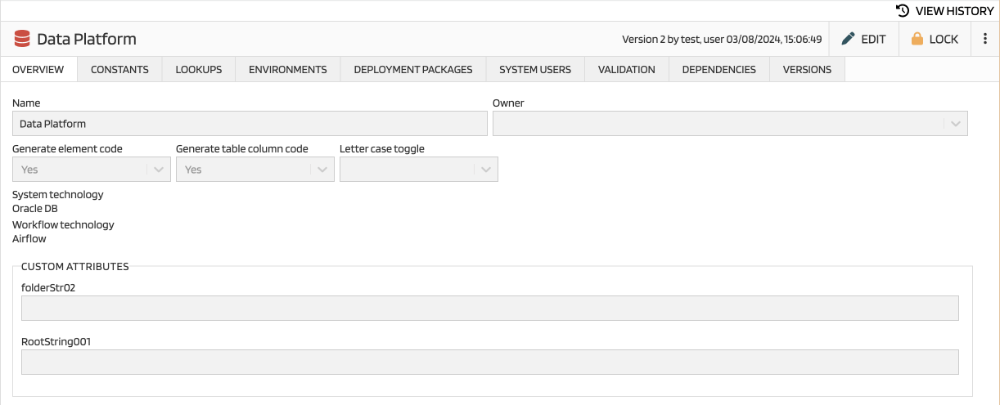
Overview #
This tab contains basic information about the application metadata behaviour:
| Attribute | Description |
|---|---|
| Name | Name of the application |
| Owner | A default owner of elements. Selection from System Users |
| Generate element code | Default settings of element code automatic generation (see Basic principles) |
| Generate table column code | Default settings of table column code automatic generation (see Basic principles) |
| Letter case toggle | A switch between upper or lowercasing of codes |
| Custom attributes | All attributes defined for the Folder element. |
Custom attributes are inherited, i.e. the same attribute on folder level takes its value from a parent when not specified.
Technology settings #
Technology settings is defined during the system creation and it is not possible to change it later. There are two technologies defined - for system (a database) and for workflow.
Constants #
This tab contains a list of constants, i.e. references to a value. Constants can be used in lots of codes (e.g., column mappings) and this is a single place where constant value is changed.
| Attribute | Description |
|---|---|
| Name | Friendly name of the constant |
| Code | Shortened name for usage in scripts |
| Domain | Definition of a data type |
| Value | Value of the constant |
| Description | Deeper explanation of the constant |
More about constants usage is described here.
Lookups #
Lookups are often used code fragments that can be used in scripts.

| Attribute | Description |
|---|---|
| Name | Friendly name of the constant |
| Code | Shortened name for usage in scripts |
| Domain | Definition of a data type |
| Data Type | Defined by Domain |
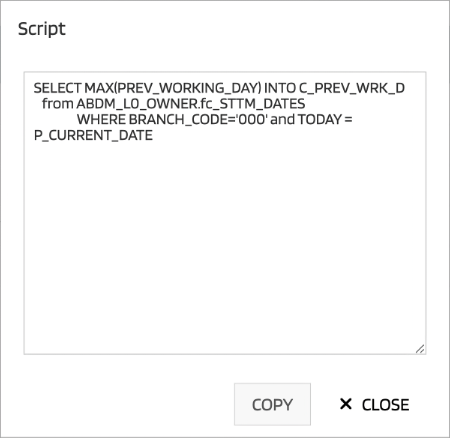
| Script | A piece of code that will be inserted to a place where lookup is used |
| Description | More deeper explanation of the constant |
An example of script for looking of previous working date.
More about constants usage is described here.
Environments #
MetaCroc allows to define environments and store information about version of an element deployed to each of them. Here can users create a list of environments for the system.
| Attribute | Description |
|---|---|
| Name | Name of the environment (e.g., PROD, TEST, etc.) |
| Code | Shortened name |
| Description | Detailed information about the environment |
| Connection string | Script that allows to connect to a database |
| Git URL | Link to Git repository |
| Git LoginName | Git credentials |
| Git Password Token | Git credentials |
| Production | A flag that marks this environment a production one |
Deployment Packages #
A list of packages of elements for deployment. More detailed description of Deployment Packages and theirs usage is here.
System Users #
System users are connected to the system technology. They can be used as a schema names in specific technologies. Also element permissions can be assigned to these users and used in output generation.
The tab where list of system users is managed.
| Attribute | Description |
|---|---|
| Username | Registered name of the user |
| Comment | Other text information about the user |
| Description | Other text information about the user |
Validation #
There are presented all validations from all elements in the folder. More about validations here.
Dependencies #
Only manual dependencies are available on folder level. More about dependencies is here.
Create new System #
For creating of a new system, user has to use a “+” button in the icon bar of the elements tree:
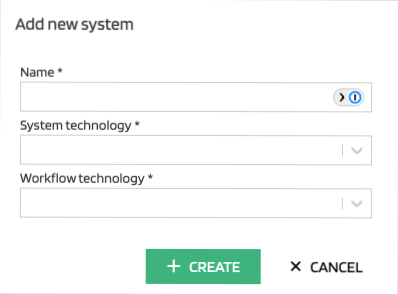
The button triggers a dialog where basic information about the system is entered:
| Attribute | Description |
|---|---|
| Name | A name of the system |
| System technology | A selection from available list of data storage technologies |
| Workflow technology | A selection from available list of workflow technologies |
System and its technologies determine (with other metadata) a template that will be used. You can create several systems with different technologies and create a set of templates dedicated for each technology separately.