Mapping #
Mapping represents transformations between tables. It is based od SQL definition, i.e. it expects that a data engineer is able to write selects and use it for modeling transformations into the target structure. It has an advantage when it is necessary to approve transformations with business users - they are able to evaluate if the target dataset contains all necessary data. The SQL command can be easily transform to core mapping metadata.
The output scripts can be based on this SQL command (PL/SQL procedure, PySpark script) but it is not mandatory - mapping contains metadata that allows to use it in pure Python transformation scripts using libraries like Pandas, etc.
Mapping stereotype #
Mapping stereotype is important attribute that determines ETL pattern and a proper template selection. A template should exist for each stereotype to generate an output script with a proper behavior. The built-in stereotypes are described in the table:
| Stereotype | Type | Description |
|---|---|---|
| Reference table mapping | behavioral | Mapping with this stereotype is automatically generated when table stereotype is set to Reference. It does not contain explicit column mappings because both reference and translation mappings can be derived from the reference table structure. |
| History generic mapping | behavioral | Mapping with this stereotype is automatically generated when table is marked as having historical table. Historical mapping does not contain explicit column mappings because ETL to historical table (SCD4) can be derived from the table structure |
| File generic | behavioral | Generic stereotype available for tables with Interface stereotype |
| File custom | behavioral | Stereotype used for data ingestion from files with an explicit column mapping |
| DB link generic | behavioral | Generic stereotype available for tables with Interface stereotype |
| DB link custom | behavioral | Stereotype used for data ingestion from a database with an explicit column mapping |
| Diff update | default | Most common patterns for data transformations |
| Diff merge | default | Most common patterns for data transformations |
| Diff insert | default | Most common patterns for data transformations |
Other stereotypes with the type of Custom can be added in Settings/Stereotypes.
Overview #
The Overview card contains all attributes described in Overview card description in the common area of this documentation.
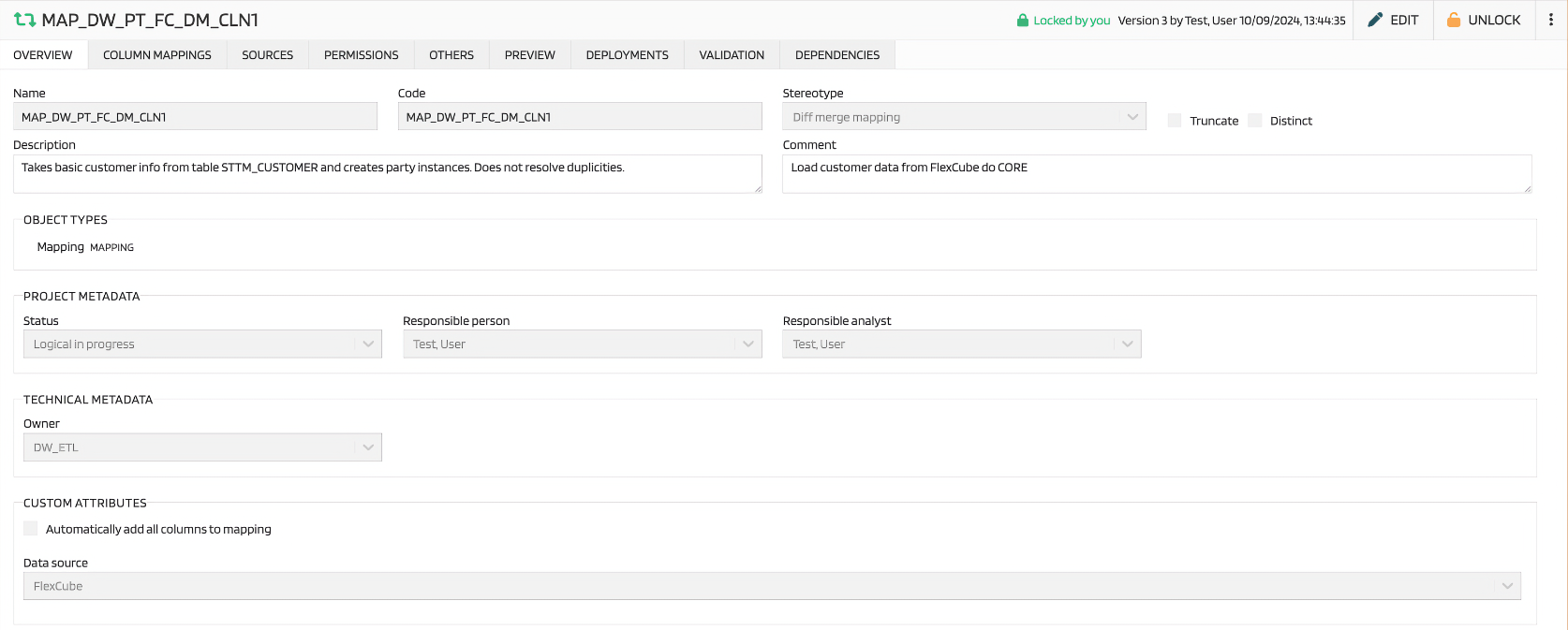
The mapping-specific attributes here are:
| Attribute | Description |
|---|---|
| Truncate | Flag used in script, delete table content before load data. |
| Distinct | Flag used in script, work with distinct key values. |
Sources #
As mentioned above, mapping is typically based on SQL command. Sources tab contains data from FROM clause, ideally in structured form to keep links between sources and targets (it is possible to write the whole FROM clause to the TEXT tab but it is better to break it to a separate parts).
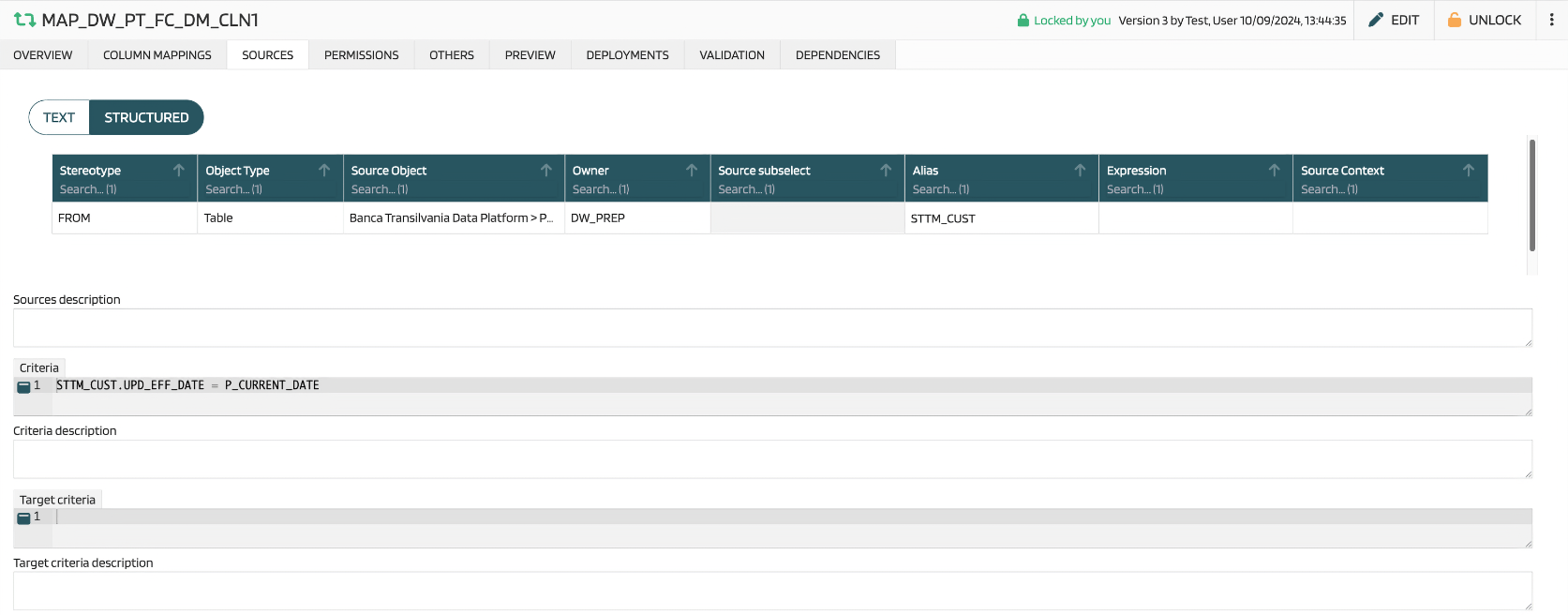
Each source has a stereotype - it specify how the source is joined. Options are
- FROM
- JOIN
- LEFT JOIN
- RIGHT JOIN
- FULL OUTER JOIN
It is possible to use several kinds of sources:
- TABLE
- VIEW
- SUBSELECT
- DUMMY
The rest of the attributes is known from SQL:
| Attribute | Description |
|---|---|
| Source object | Source object is selected from the list of objects of selected type |
| Owner | Owner of the selected object, one of System users |
| Source subselect | Only for SUBSELECT stereotype. It allows to enter subselect. |
| Expression | How the source is connected to the rest sources (ON condition) |
| Source Context | Other text metadata that can be used in the template for specific purposes |
| Sources description | A free text that allows to comment sources if necessary |
| Criteria | WHERE clause from the SQL |
| Criteria description | Description of the criteria |
| Target criteria | HAVING clause from the SQL. |
| Target criteria description | Description of the target criteria |
Column mappings #
Column mappings tab contains information about algorithms that fill each column.

| Attribute | Description |
|---|---|
| Key flag | This flag marks columns used for records identification |
| Update flag | This flag mark columns that should be updated by the mapping |
| Group by flag | Used for aggregation key columns |
User can add columns one by one or add the set of columns by clicking on button Fill columns…
Mapping context menu #
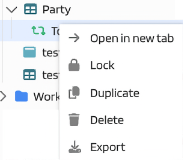
There are mapping actions available in the project tree:
| Action | Description |
|---|---|
| Open in new tab | Open a new tab with the mapping |
| Lock/Unlock | Management of locks |
| Duplicate | Creation a copy of the mapping |
| Delete | Deletion the mapping |
| Export | Export of mapping metadata in JSON format |