
Deployment #
MetaCroc does not allow to deploy generated codes to target environments. As SaaS, it typically does not have access to the customer’s IT landscape.
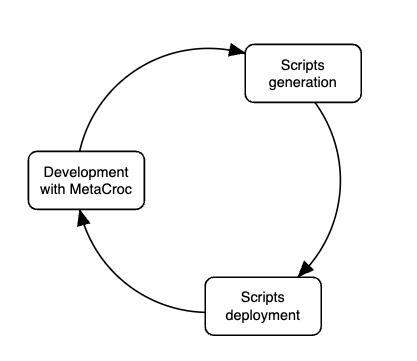
There are several ways how to manage deployments:
- Manually
- Manually with Git
- Using Git directly fromMetaCroc
Information about deployed version can be returned back to MetaCroc. It helps with Data Governance processes and also it allows MetaCroc to generate ALTER DDL scripts for the specific environment. Deployed version can be added to MetaCroc
- manually in Deployments tab
- automatically via API
Manual deployment #
Each user can generate and download scripts directly in Deployments tab. There are two options
- Preview
- Create
Both options generates output script that can be downloaded to a local PC and then deployed.
Keep in mind that Preview scripts are generated from working data and Deployments from pushed versions. User with unpushed changes gets different script in Preview than other users.
With manual deployment, also information about deployed versions should be added to MetaCroc manually.
Manual deployment with Git #
Instead of manual deployment, the development team can use a source code management (SCM) tool together with CI/CD integration tool, e.g., Jenkins, Git Actions, etc.
In this case, generated scripts should be added manually to SCM tool to maintain feature branches, code reviews, merges and CI/CD pipelines for deployment. Information about deployed versions can be added to MetaCroc manually.
MetaCroc with Git deployment #
If script is generated in Deployments tab, user can push the script to Git instead of download it. For this purpose, it is necessary to set access to Git (in System/Environments tab, see System. The both username and the personal access token are necessary to fill before using Git.
Then users can use Push to Git feature. It creates personal feature branch in git and arrange commit and push to it (users can also use Deployment Packages feature in MetaCroc that works with sets of elements and allow to organize feature branches by (e.g.) development tickets - deeper detail in Deployment Packages)
Deployment process - example #
Data engineering team can set process based on its needs. One of the possible process is in the picture:
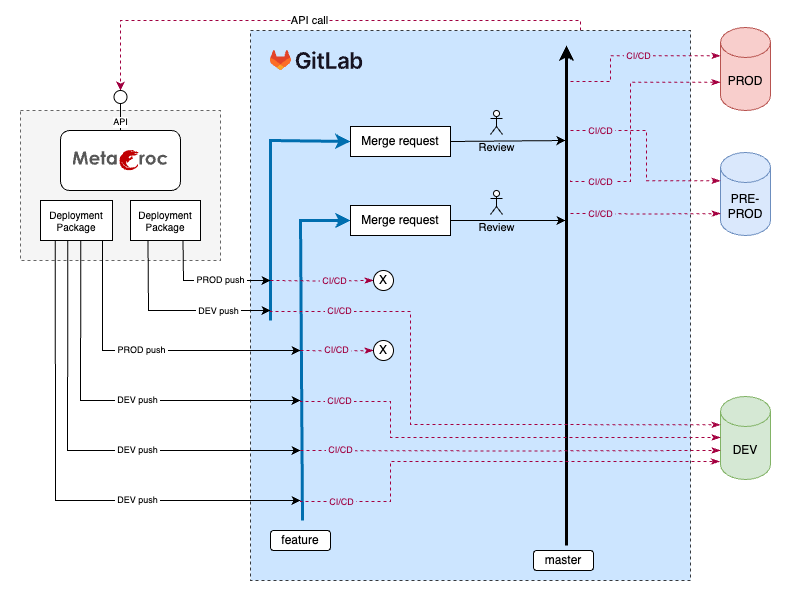
- Team uses deployment packages for changes done during a development ticket, (e.g., JIRA ticket). For each ticket, one deployment package is created.
- Deployment package elements are pushed to a feature branch in Git by Push to Git button on DEV environment
- in Git, a CI/CD pipeline is triggered after the push and deployed to DEV environment
- information about deployed version is saved to MetaCroc
- MetaCroc can generate ALTER scripts for each push
- finally, the team generates the final package for PROD environment (the difference is in ALTERs)
- owner of the feature branch creates merge request and asks for peer review
- when approved, the feature branch is merged to master branch
- CI/CD pipeline deploys the package to PRE-PROD environment and when everything is OK, another CI/CS deploys the package to PROD environment
MetaCroc can store information about element version deployed to each environment. This information can be entered manually or (as a part of CI/CD pipeline) can be entered via API. For this purpose, MetaCroc generates a file with necessary metadata as a part to Push to Git action for each generated script.