Metadata versioning #
MetaCroc stores data in internal database. It happens in two situations:
- Push
- Autosave
Push #
Push is available for all elements in edit mode. When user finishes his work, use Push button and fill the dialog:
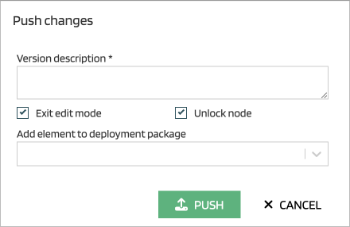
| Attribute | Description |
|---|---|
| Version description | Push comments, e.g. link to ticket, changes description, etc. |
| Exit edit mode | Switch element to view mode |
| Unlock node | Allow other users to edit the element |
| Add element to deployment package | Directly assign the element to the deployment package for further processing towards deployment |
It is possible to create a new deployment package directly from this dialog by typing its name to the dropdown search field.
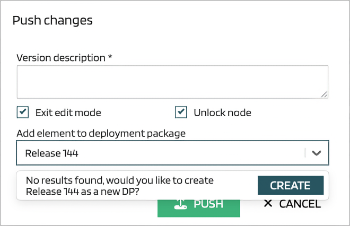
Each push creates a new version of the element in MetaCroc repository. The version metadata is taken from the push dialog and enriched by timestamp and identification of the user.
Autosave #
When user switch an element to edit mode, MetaCroc starts to save all changes to a working area of the user. The behaviour of the working data is as follows:
- changes saved in working area are not visible for other users
- changes are used for outputs generation in Preview for the current user only
- for the current user, scripts generated by Create or Push to git are still generated from the latest pushed version.
Changes in working area are deleted
- when the user cancels edit mode
- when user pushes a new version