
Users #
MetaCroc works with named accesses, i.e. each user has a separate account. There are two ways how to manage users in MetaCroc:
- directly in Setting/Users
- via Active Directory connected to MetaCroc
If you want to connect MetaCroc to AD, contact MetaCroc Support.
Users list #
List of users is available in Settings/Users.

There are information about users in the list and also actions available:
| Action | Description |
|---|---|
| Edit | Edit of users data. |
| Edit permissions | Change permissions for the user . |
| Block user | Make user inactive. User cannot login. |
| Reset password | Send an e-mail to user with information how to change password. |
| Delete | Delete user completely. |
User permissions #
As MetaCroc is prepared as an open development tool, there is not too many dangerous actions that should be limited for some users. There is a list of permissions.
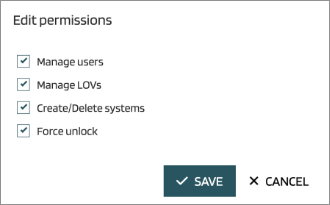
| Permission | Description |
|---|---|
| Manage users | A privilege to add or delete users |
| Manage LOVs | A privilege to change all settings |
| Create/Delete System | A privilege to add or delete root node - System |
| Force unlock | A privilege to unlock an element locked by other user |
Force unlocking of an element causes all working data prepared by other user is deleted.
Add new user #
New user can be added by Add button pressing in the users list. A dialog appears:
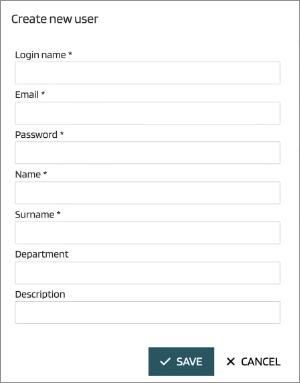
Password is not generated, there can be filled anything. User has to change its password after the first login.
The second step of new user creation is setting of its permissions.